ISSUE

107


Mar 2021

ITU Logo with text

TOUCH BASE

e-Newsletter


Content

1. Comparison of MS Teams in Different Platforms

2. Q&A for 360 Camera Installed in Teaching Venue (Staff Only)

3. Online Marking in VL Room

4. IT Mega Sales for Semester 2


1. Comparison of MS Teams in Different Platforms

Student and staff are drawn attention there are different capabilities of MS teams in various platforms. Using desktop application is recommended and there is a support page listing the comparison for reference,


Meetings and live events - Office Support (microsoft.com)

2. Q&A for 360 Camera Installed in Teaching Venue (Staff Only)

Here are Q&A for using 360 Camera:


Q1 : What do I need to prepare for using 360 Camera?


A1 : If you are the first-time user, it is recommended to approach teaching venue one day before class, to test and experience 360 camera before your class.


Q2 : How to fix when 360 Camera cannot move?


A2 : Please press power button on 360 camera for 5 seconds to turn it on. If Power LED (Blue) does not turn on after pressing, please contact ITU helpdesk for support.


Q3 : How to fix when 360 Camera turns to student side and cannot turn back to me?


A3 : Please try to (a) turn the camera off (b) turn the camera to you manually (c) turn it on again.


Q4 : Why there is no camera signal in MS teams / Zoom?


A4 : Please try to (a) turn off MS teams / Zoom (b)turn on classroom AV system (c) enter MS teams / Zoom again and there should be camera signal.


Q5 : Why camera signal in MS teams / Zoom shows that from Visualizer, not from 360 Camera (in Lecture theatre)


A5 : You may manually select camera signal if MS teams / Zoom wrongly select visualizer as camera signal

3. Online Marking in VL Room

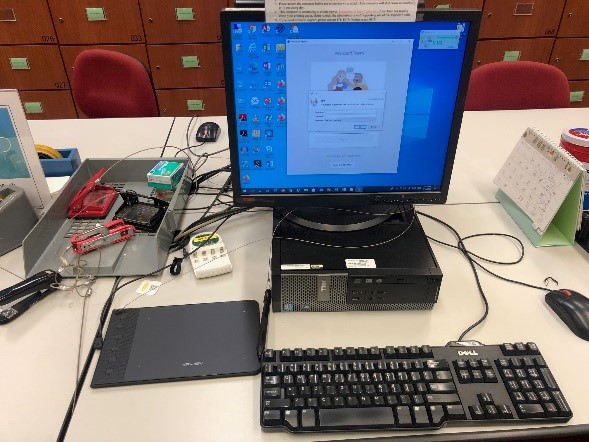
ITU is pleased to announce writing tablet is installed in VL room in HHB / WK campus to facilitate online marking in VL rooms. Apart from new provision, writing tablet is installed in all teaching venues for related activities.


4. IT Mega Sales for Semester 2

ITU is pleased to announce another round of IT Mega Sales is started, details please refer to the table below,


Brand (Hotline)* Online Ordering
Apple
(1833 282)
Click Here

* Mon - Fri: 9:00am - 6:00pm (Closed on Sat, Sun & Public Holidays)


User may check IT Product Mega Sales in CPCE Portal (https://portal.cpce-polyu.edu.hk) or contact vendor for information.