1. Student Email Address Domain Migration Exercise
Referring to the ITU notification on 12 Jun 2021, the student email address domain migration exercise was completed. Please find the following points for your attention:
Staff
- Please communicate with students using their @common.cpce-polyu.edu.hk
- If you are using @student.hkcc-polyu.edu.hk for teaching, scheduling teams meeting, please note this account is changed to @common.cpce-polyu.edu.hk.
- No "ccstd_" prefix in new login name, e.g., "ccstd_pfstaff" becomes "pfstaff" when logging-in @common.cpce-polyu.edu.hk.
- If you are using @student.speed-polyu.edu.hk for teaching, scheduling teams meeting, please backup your files before 31 Dec 2021. SPEED student account cannot be used for scheduling teams meeting. Please use @common.cpce-polyu.edu.hk instead.
- Different password is recommended for CPCE staff and @common account to minimize confusion during SSO Login.
- Beware of wrong email cache, e.g., old student account. Please use input full student email address instead of student ID for sending email / appointment to student.
HKCC Student
- You may receive duplicated notice from college during transition period (before 30 Sept 2021).
- No further use of HKCC student email address. Please change to @common email address if your old HKCC student email address is used/registered for receiving outside information.
SPEED Student
- Your old SPEED account has changed to xxxxxxxxSU@student.speed-polyu.edu.hk / xxxxxxxxBU@student.speed-polyu.edu.hk, and containing your old data. (No change in password)
- Email sent to old SPEED account (xxxxxxxxS@student.speed-polyu.edu.hk / xxxxxxxxB@student.speed-polyu.edu.hk) will be forwarded to SU/BU account.
- Since most of systems, e.g., my.SPEED, are pointed to new account. You should login SU/BU to backup data only (You can still use all office 365 service in SU/BU account)
- SU/BU account will be terminated on 30 Sept. Please backup data before the date.
- No further use of SPEED student email address. Please change to @common email address if SPEED student email address is used for receiving outside information.
- For mobile device user, please sign-out and then sign-in using @common account or it may connect to wrong account.
Please visit the web site (https://emig.cpce-polyu.edu.hk) to get the detail information about this migration.
|
 |
 |
2. Microsoft Teams Meeting Recording Files Location
Starting from 2 June 2021, Microsoft Teams meeting recordings is saved to either in Teams Channel or OneDrive, depends on the meeting type (Channel meetings or All other meetings).
Previous recordings will retain its location in Microsoft Stream.
1. Meeting Recording location
1.1. Channel meetings
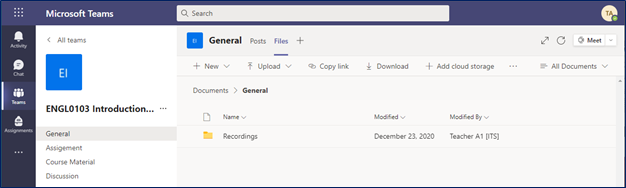
For channel meetings, such as class Teams site, recording will be stored in the folder called “Recordings” in the Files tab of the channel (Teams SharePoint Site).
You can click “…” and “Open in OneDrive” or “Get link” to view the recording or get recording link via MS Teams.
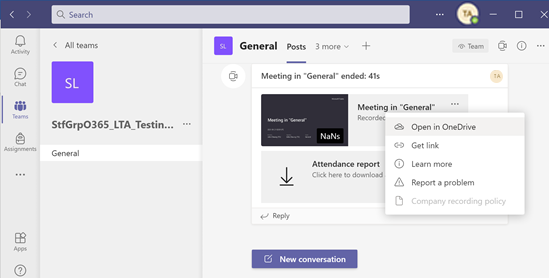
Permissions of the recordings are inherited from the owners and members list in the channel, i.e. all members/students enrolled in the channel/class will automatically have access to the recordings.
Tips:
The recordings in channel meeting can be edit/delete by members/students that saved in “Recordings” folder.
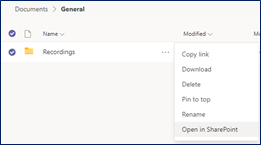
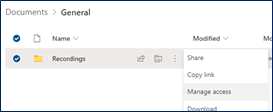
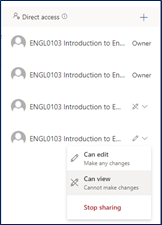
To disable edit/delete for members/students, the Teams site owner (such as teachers, TAs) have to set “Can view” only for “Recordings” folder in SharePoint as steps below.
|
← Click “…” then “Open in SharePoint”
|
|
← In SharePoint, click “Manage access”
|
|
← In member group, mark as “Can view”
|
1.2. All other meeting
For non-channel meeting, recording will be stored in the folder called “Recordings” in the OneDrive directory of the person who started the recording.
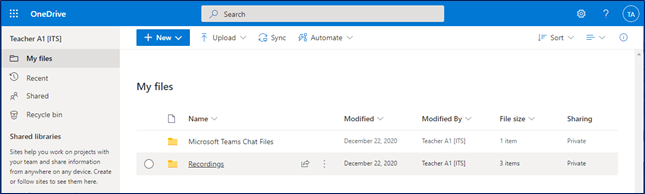
All meeting invitees, except external users, will automatically get a personally shared link of the recording. (External users will need to be explicitly
added to the shared list by the meeting organizer or the person who started the meeting recording.)
|
 |
|
3. Microsoft 365 Apps and Services Will No Longer Support IE11 After August 17, 2021
Once this change takes effect, Microsoft 365 apps and services, including SharePoint Online and OneDrive, will not be supported on IE 11.
This means that after the above dates, customers will have a degraded experience or will be unable to connect to Microsoft 365 apps and services on IE 11.
For degraded experiences, new Microsoft 365 features will not be available or certain features may cease to work when accessing the app or service via IE 11.
|
 |
4. Skype for Business Online Retires July 31, 2021
As Microsoft Teams has become the core communications client for Microsoft 365, the Skype for Business Online service will retire July 31, 2021. At that point, access to the service will end.
While you will no longer be able to use Skype for Business Online once the service retires, July 31, 2021, you may continue to use Microsoft Teams.
|
 |
|
5. Result Announcement: Lucky Draw Winners of "Survey on IT Services"
ITU has conducted "Survey on IT Services" for staff and students in mid-April 2021. We have received a favourable response of about 500 responses.
Users' feedbacks provide us a solid ground to improve our services continuously.
To show our gratitude, students who completed the survey entered the lucky draw automatically.
Result of Luck Draw
The lucky winner who has won the grand prize of AirPods Pro is Mr Yu Kin Hei from HKCC.
Dr Jason Chan, JP, Head of Information Technology, presented the prize to the winner on 15 Jun 2021.

We also wish to take this opportunity to thank all participants for taking time to share valuable feedback and suggestions with us.
|
 |
|

