1. Teams Creation by School Data Sync (Staff Only)
Creating Teams for Individual/Lecture Group of teaching subjects become easier and convenient for teachers.
As shared in our IT webinars last week, ITU integrated Moodle and MS Teams successfully,
the Teams owners (i.e. teachers) and members (i.e. students) will be added/removed according to the daily changes of Moodle subject enrollment records and Student Management System(SMS).
Teachers need to activate the Teams for allowing students to view and participant. For details, please refer to
online user guide for Staff .
|
 |
 |
|
3. Tips on Moodle Home Page
Mass Message on the Top
Under the label "CPCE Moodle 3.5", there will be lots of messages showing to selected Moodle users (staff/students)
- Promotion message
- Files for some topics
- Links of available surveys
- Announcement from Unit / ITU
Course List
Apart from the teaching courses, there are different types of Moodle courses available.
- Scheme/ Programme Pages
- Teaching Subjects
- Academic Advisor Pages
- Online Tutorial on Academic Integrity
- CSAO Complementary Studies Programme (CSP)
- Survey / HKCC CAT Eligible Programme / SPEED Special Pages
Using Calendar
The calendar can display site/course events, for example, the deadlines of Moodle Assignment, Turnitin Assignment, Quiz and other activities. By clicking the events on the calendar, users can go to the pages of activities directly.
For details, please refer to the online user guide
[Staff:5 Home Page] and
[Students:5 Home Page].
|
 |
|
4. Enhancement on Classroom for Hybrid Teaching
360 Camera V2
There is new version of 360 Camera, V2, installed in Lecture Theatres of HHB and WK campus. Different to original 360 camera which only supports horizontal tracing, V2 supports vertical tracing as well.
360 Camera V2 requires manual recognition by waving your hand. There is video guide inside IT support page (
https://it-support.cpce-polyu.edu.hk
) -> Hybrid Teaching -> 360 Camera V2 and there is quick guide on lectern about the offer.
Ceiling Microphone
There are 5 classrooms (see below) setup with ceiling microphone to provide easier way for in-classroom and online participant to communicate.
User needs to turn on microphone button on lectern to enable the microphone (also disable using same button).
Classroom list
HHB : HHB-501, HHB-504, HHB-507
WK : WK-N901, WK-N902
AV upgrade in WK campus
AV system in WK campus is upgraded during summer time aligned to HHB standard. User may refer to the following table for change of connection after the enhancement work.
|
Old |
New |
| VGA |
✔ |
|
| HDMI |
✔ |
✔ |
| USB-C |
|
✔ |
| Apple TV(Tablet) |
✔ |
✔ |
|
 |
|
5. Microsoft 365 Tips
1. Free Microsoft Office App License for Students and Staff
Microsoft 365 enables current students and staff to install the latest version of Microsoft Office app on your PC/Mac, tablet or smart phone for free. Each student and staff can install Office on up to 5 PCs/ Macs, 5 tablets (iPad, and Android) or smart phones.
Software available for installation include:
For Windows

For Mac OS

For the detail installation guide, please login CPCE Portal and refer to the ‘Office 365 OWA User Guide’
As the free license is only available to current students and staff, users are required to uninstall Microsoft Office when they are no longer a member of the CPCE College community.
 2.Collaborate on a project between members in the group
- Create documents and collaborate online (OneDrive for Business)
- Co-authoring and versioning
- Use Office Online to review and modify documents, PowerPoint by the members concurrently
- Online meeting (Teams)
- Create a plan, build a team, assign tasks, and update status—in a few easy steps. (Planner)
- Share calendars and schedule meetings (Calendar)

Organize your course content
- Organize your lesson plans and course content in your own
 digital notebook. digital notebook.
- Keep everything in a OneNote, and use its powerful search to find what you're looking for, even text in pictures or handwriting.
- Your notebooks are saved automatically and can be viewed from any devices, online or offline.
Click here to login your email account, click the top left icon  to access those features. to access those features.
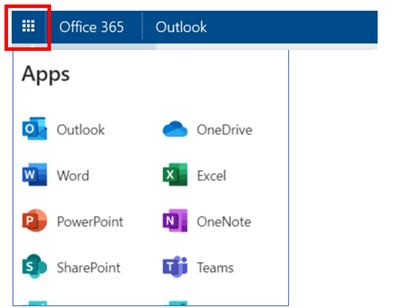
Microsoft also provide the related Apps for Android and Apple IOS mobile devices.


In order to find out more about the benefits of Microsoft 365, please reference to the Microsoft Office Training Center.
|
 |
|
6. Mega Sales
ITU is pleased to announce CPCE Mega Sales has started. There are 7 brands, including Samsung, Lenovo, HP, Fujitsu, Dell,
Apple, Acer this round. Interested student and staff can visit IT Products Mega Sales page inside CPCE portal
https://portal.cpce-polyu.edu.hk for offering details.
|
 |
7. Reminder on @common Migration for SPEED Students
SPEED students are reminded as follows
- Deadline to backup data from xxxxxxxxSU@student.speed-polyu.edu.hk / xxxxxxxxBU@student.speed-polyu.edu.hk will be on 30 Sept 2021.
- This email account will be terminated after 30 Sept 2021. No data recovery is possible.
- If you have not configured email forwarding, please enable the feature on or before 30 Sept 2021.
For details of data migration, please refer to the steps in Email Migration Web,
https://emig.cpce-polyu.edu.hk
|
 |
8. Dis-support of Outlook 2010 and 2013
As informed by Microsoft, Outlook 2010 and 2013 will be dis-supported (cannot connect Microsoft Email server) started from 1 Nov 2021.
Please follow the steps on “Microsoft 365 tips” above to install new version of outlook for home / personal notebook or ITU for support if outlook 2010/2013 is installed in Campus PC (Staff PC).
|
 |
9. 3D Printing Service for Academic / Student Projects
To better co-ordinate 3D printing request through the semester, colleagues are suggested to inform ITU via
3d-print@cpce-polyu.edu.hk about 3D printing request in beginning of semester including expected quantity,
submission and completion time (in which week). ITU will prioritize user request based on information received.
Should colleagues want to understand 3D Printing service details or take a visit to 3D printing facility, please feel free to contact Devil Yip at 3746-0790 or John Cheung at 3746-0594.
|
 |
|