1. Microsoft 365 Tips
1. Free Microsoft Office App License for Students and Staff
CPCE Staff and Students are entitled to install the latest version of Microsoft Office on up to 5 PC/Mac, 5 tablets (iPad / Android) or smart phone for free.
Software available for installation include:
For Windows

For Mac OS

For the detail installation guide, please login CPCE Portal and refer to the ‘Office 365 OWA User Guide’
As the free license is only available to current students and staff, users are required to uninstall Microsoft Office when they are no longer a member of the CPCE College community.

2.Collaborate on a project among members in the group
- Create documents and collaborate online (OneDrive for Business)
- Co-authoring and versioning
- Use Office Online to review and modify documents, PowerPoint by the members concurrently
- Online meeting (Teams)
- Create a plan, build a team, assign tasks, and update status—in a few easy steps. (Planner)
- Share calendars and schedule meetings (Calendar)

2.Organize your course content
- Organize your lesson plans and course content in your own
 digital notebook. digital notebook.
- Keep everything in a OneNote, and use its powerful search to find what you're looking for, even text in pictures or handwriting.
- Your notebooks are saved automatically and can be viewed from any devices, online or offline.
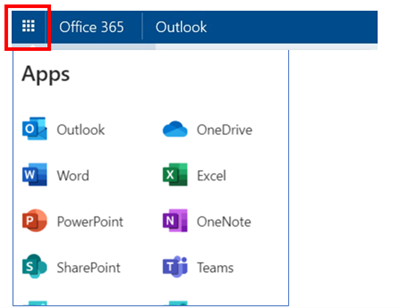
Click here to login your email account, click the top left icon  to access those features. to access those features.
Microsoft also provide the related Apps for Android and Apple IOS mobile devices.
Apple IOS
https://itunes.apple.com/us/developer/microsoft-corporation/id298856275

Android
https://play.google.com/store/apps/developer?id=Microsoft+Corporation
In order to find out more about the benefits of Microsoft 365, please reference to the Microsoft Office Training Center.
|
 |
 |
2. AV Enhancement in Campus
It is pleased to announce the following AV enhancement work is done in summer time.
Cable microphone in classroom
All classrooms in HHB / WK campus is setup with a cable microphone which can be served as an additional microphone for hybrid discussion or ad hoc purpose.
360 camera v2 in WK campus
There are 20 sets of 360 cam v2 setup in WK campus
UG: SUG01, SUG02, SUG03
1/F: N101, N102, N103, S101, S102, S103, S114, S115
2/F:S201, S202
11/F:S1101, S1102, S1103, S1104, S1116, N1101, N1102
Request of Cone (IR) microphone
For request of cone (IR) microphone, accessories, e.g., battery, charger, colleagues please fill information via online form
https://forms.office.com/r/y23Cr1MyKD
. Items will be delivered via internal mail. For enquiry, please email to
irmic@cpce-polyu.edu.hk
|
 |
|
3. Mega Sales
ITU is pleased to announce CPCE Mega Sales has started. There are 7 brands, including Apple, Acer, Asus, Dell, HP, Lenovo, Microsoft this round. Interested student and staff can visit IT Products Mega Sales page inside CPCE portal
https://portal.cpce-polyu.edu.hk for offering details.
|
 |
|
4. Result Announcement: Lucky Draw Winners of "Survey on IT Services"
ITU has conducted "Survey on IT Services" for staff and students in mid-April 2022. We have received a favourable response of about 500 responses.
Users' feedbacks provide us a solid ground to improve our services continuously. To show our gratitude, students who completed the survey entered the lucky draw automatically.
Result of Luck Draw
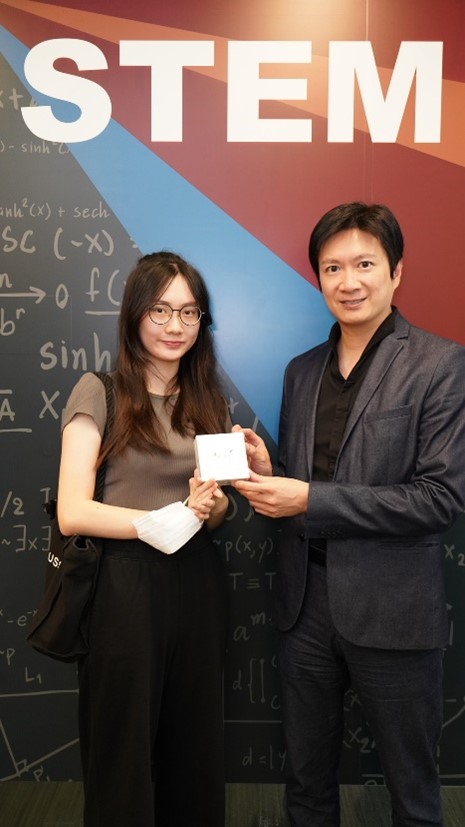
The lucky winner who has won the grand prize of AirPods Pro is Miss Lam Cheuk Wing Jasmine from HKCC.
Dr Jason Chan, MH, JP, Assistant Dean (Innovation and Entrepreneurship) and Head of Information Technology, presented the prize to the winner on 7 July 2022.
We also wish to take this opportunity to thank all participants for taking time to share valuable feedback and suggestions with us.
|
 |
|

