1. Migration of Current Student Email System to Office 365 in June 2013
Background
As advised by the email service provider, Microsoft, current student email system will have to migrate from Outlook-Live to Microsoft Office 365 by the end of June 2013.
What are the improvements of this upgrade?
Below is a comparison between current Microsoft Outlook Live Based Email features and Office 365 features:
| Email |
Current Email (Outlook Live Based Email) |
New Email
(Office 365) |
| Inbox Size Limit |
10GB |
25GB (+150%) |
| Attachments Size Limit |
25MB |
25MB |
| Active Sync for Phone |
Yes |
Yes |
| SkyDrive - Online Storage Limit |
7GB |
7GB |
| Microsoft Communication Features |
Current Email (Outlook Live Based Email) |
New Email
(Office 365) |
| Instant messaging |
Yes, by Skype |
Yes, by Lync Online |
| Audio, video chat and file sharing |
Yes |
Yes |
| Screen sharing |
No |
Yes |
| Online meetings |
No |
Yes |
What is school account and Microsoft personal account? What are the use of them?
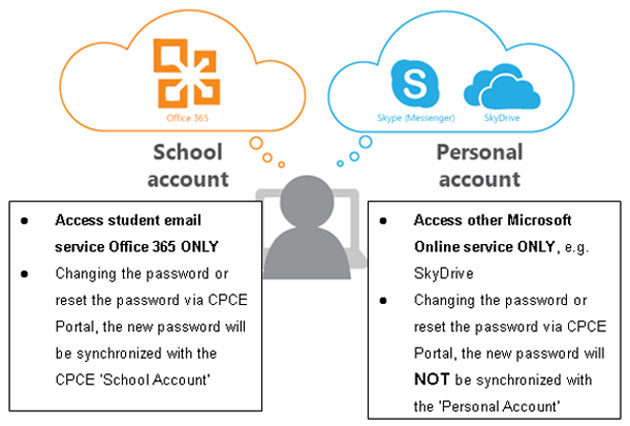
After migration to Office 365, a new 'Microsoft Personal Account' will be created using the same user name to access other Microsoft online services only, e.g. SkyDrive, Skype etc.
Below is a comparison between 'Before' and 'After' the migration to Office 365
|
 |
|
Before
|
After
|
No. of account: One
(School Account) |
No. of
account: Two
(School Account and Microsoft Personal Account)
|
Services accessed by
'School Account' |
Services accessed by
'School Account'
|
Services accessed by
'Personal Account'
|
- Email service,
- Skype,
- SkyDrive |
- Office 365 email services
- Office 365 SkyDrive (new)
- Office 365 Lync Online (instant message)
|
- SkyDrive (previous register service in www.skydrive.com)
- Skype (instant message) |
|
| |
 |
|
What is the schedule of this upgrade?
Tentative Schedule for Migration |
|
|
Phase
|
Duration |
Details |
| 1 |
1-week |
The migration of all student email mailboxes will take about 1 week to complete.
During this period, student could still access your mailbox and perform the email services as usual.
Student is reminded that changing of the CPCE user password via the CPCE Portal during the migration period, the new password CANNOT be updated to the Microsoft email system.
If you require to change a new password, please complete the process before 20 Jun 2013 or after the migration.
|
| 2 |
3 days |
After completion of Phase 1, ITU will start user account synchronization process which requires 3-day to complete, student login page and access the email system will be updated accordingly. |
|
| |
| Please click "Student Email Migration" at http://it-training.cpce-polyu.edu.hk/mod/glossary/view.php?id=196 for details or update of this exercise or contact ITU helpdesk at 3746-0818 or 3746-0819 for enquiries. |
 |
2. Staff Email Migration
Background
After analyzing CPCE's user requirement and evaluating the feasibility of hosting the email service on the cloud in the 2012, it is suggested that migration of current staff email platform to Microsoft Office 365 for Education can benefit staff and support the development for CPCE. It is estimated six months to complete this project, ITU will start to work with email service provider in July 2013.
Below is a comparison between current Email system features and Office 365 features:
Below is a comparison between current Email system features and Office 365 features:
| Email |
Current Email (Exchange 2007 System) |
New Email
(Office 365) |
| Inbox Size Limit |
2GB |
25GB |
| Attachments Size Limit |
10MB |
25MB |
| SkyDrive - Online Storage Limit |
No |
7GB |
| Microsoft Communication Features |
Current Email System |
Office 365 |
| Instant messaging |
No |
Yes, by Lync Online |
| Audio, video chat and file sharing |
No |
Yes |
| Screen sharing |
No |
Yes |
| Online meetings |
No |
Yes |
What is Office 365?
Office 365 is a hosted cloud service provided by Microsoft. It is a communication and collaboration platform that comes with a suite of Microsoft products including Exchange Online, Sharepoint Online and Lync Online.
|
 |
Exchange
Online
|
It is a messaging platform based on MS Exchange which provides 25GB mailbox quota. It can be accessed with the Outlook client, Internet browser and various mobile devices such as Windows Phone, iPhone/iPad, Android phone, etc.
|
Sharepoint
Online |
It is a collaboration platform based on MS Sharepoint which provides discussion forum, workflow and team/personal site.
|
Lync
Online |
It is a communication platform which provides instant messaging and web-based conference services.
|
|
Implementation Schedule
The project will build up the required infrastructure in support of the use of the Exchange service by all staff. The followings are the major schedule:
| Jul - Aug 2013 |
Preparation and planning |
| Aug - Sep 2013 |
Pilot stage of migration |
| Sep - Oct 2013 |
Promotion and training for the new service |
| Oct - Dec 2013 |
Migration exercise |
If you need further information about the project, please contact William Lo of ITU (Ext: 0595)
| |
|
|
3. Preview - Upcoming campus IT & AV Projects in Summer
In order to enhance campus IT & AV facilities, ITU has taken up the role this time. There are following upgrade projects in coming months,
|
 |
|
Project
|
Coverage
|
| PC Upgrade |
- HHB Classroom / Lecture Theatre / Lang Lab / SCC / Meeting Room
- WK CPCE Libraries / Lang Lab / Meeting Room
- HKCC Staff PC (Partial)
|
Monitor
Upgrade |
- HHB Classroom / Lecture Theatre / IT Lab / Lang Lab / Meeting Room
- WK Meeting Room
- HKCC Staff PC (Partial)
|
| AV Upgrade |
- HHB Classroom / Lecture Theatre / IT Lab / Lang Lab / Design Studio, Meeting Room, Special room (Except MPH)
|
|
Digital Display System (DDS) Upgrade
|
- DDS System in HHB and WK campus, including addition of some new locations
|
| Upgrade of Wired Network Connection Speed to 1Gps |
- Classroom / Lecture Theatre / IT Lab / Lang Lab / SCC / CPCE Libraries
- Advanced model IP Phone user
|
|
| |
| During captioned upgrade projects period, service interruption may occur and your patience is highly appreciated. ITU will keep update user on latest progress of projects and please contact our helpdesk at 3746-0818 (HHB) or 3746-0819 (WK) or email to pfitoper@cpce-polyu.edu.hk for any enquiries. |
|