ISSUE

27


October, 2013

ITU Logo with text

TOUCH BASE

e-Newsletter


Content

1. Free Upgrade to Windows 8.1 (For Windows 8 User)

2. Email Client Connection to Public Email Service

3. Reminder : Email Bounces Back When Sending Email to PolyU Staff (Staff Only)


1. Free Upgrade to Windows 8.1 (For Windows 8 User)

Microsoft’s Windows 8.1 is now available for Windows 8 Users to free upgrade. If you are Windows 8 user and want to experience the new Windows 8.1 features (http://windows.microsoft.com/en-us/windows-8/features), please follow two steps below to upgrade your Operating System:

  1. Access "Windows Store" in start screen
  2. Click the following link to upgrade Windows

Should above link is not available in Windows Store, please perform Windows Update to ensure necessary system patching is done to allow Windows 8.1 upgrading. For staff who installed their Windows 8 via Microsoft work at home use right, please contact ITU helpdesk for upgrading.

With immediate effect, Windows 8.1 will replace its 8.0 version in Microsoft Work at Home Use Right for all CPCE staff. For staff who desires Windows 8 instead of Windows 8.1 in his/her notebook computer, please contact ITU helpdesk at x0818 / x0819 for special arrangement.

win8

2. Email Client Connection to Public Email Service

In response to the request to access Gmail, Yahoo Mail and Live.com using mobile device in CPCE campuses, ITU is glad to announce mobile device users can access the above mentioned email services via CPCE Wi-Fi system with immediate effect. To prevent spam mail, users should only use authenticated outgoing server (SMTP) to send out email. Please refer to guideline on email service provider’s web site for configuration on email client. User is welcome to contact ITU helpdesk at x0818 / x0819 for feedback and enquiry of this new arrangement.

Email Client

3. Reminder : Email Bounces Back When Sending Email to PolyU Staff (Staff Only)

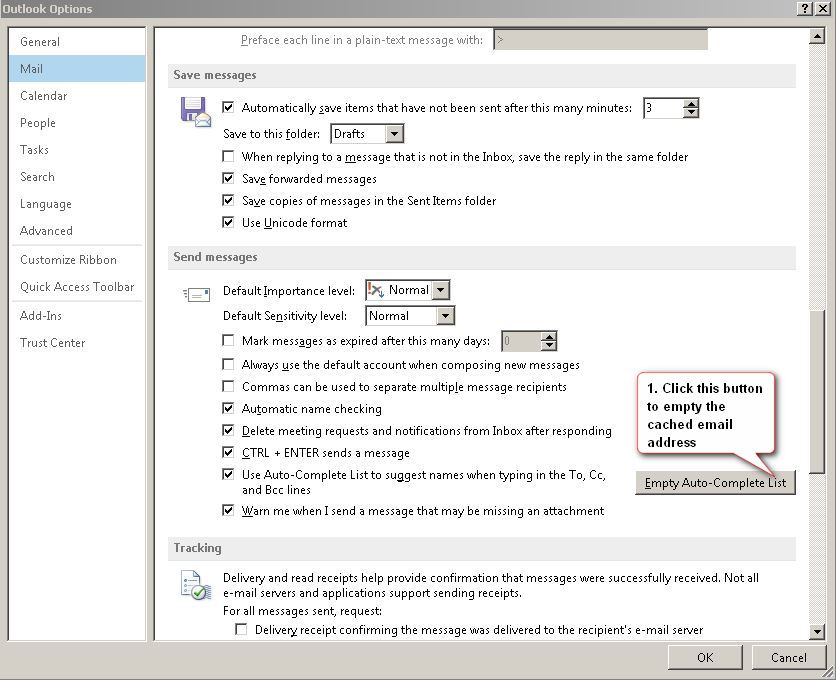
As reported by some staff that they cannot send email to PolyU Staff and receive bounced back message, it is found their MS Outlook's auto-complete lists were obsoleted after synchronizing PolyU email address in CPCE email server. Users are advised to follow six steps below to clean up the outdated 'Auto-Complete List' in your Outlook Client for this issue.

  1. Open the Outlook Client
  2. At the top left hand corner, click the 'File' -> 'Options'
  3. In the pop up window, click the 'Mail'
  4. Locate the 'Send messages' section on the right hand side.
  5. Follow the screen below to empty the cached email address by clicking the 'Empty Auto-Complete List' button.


  6. Press 'OK' button

Should user has any questions, please contact ITU helpdesk at x0818 / x0819.

Outlook