ISSUE

58


May 2016

ITU Logo with text

TOUCH BASE

e-Newsletter


Content

1. Reminder: Note to Students Who Will Graduate or Leave From HKCC / SPEED

2. Notification of Security Alert: Vulnerabilities in Apple QuickTime For Windows

3. Renovation Work Inside HHB Student Computer Centre

4. Audio-Video (AV) Works in Summer


1. Reminder: Note to Students Who Will Graduate or Leave From HKCC / SPEED

Please note that the following IT services will be terminated after you graduate or leave from HKCC / SPEED:

  • Student email account
  • Microsoft OneDrive bundled with student email account
  • Microsoft Office 365 ProPlus applications (Microsoft Office / Mac Office) offered via student email account
  • Print quota account
  • Student Notebook Loan Service
  • Campus Wi-Fi service, including Eduroam
  • Moodle
  • Campus PC / my.HKCC / my.SPEED / other systems login
  • Access to Student Computer Centre

Reminder:

  • Please backup data/files from the above systems if you need to keep them before graduation in order to prevent inconvenience and /or data loss.
  • Remaining balance in print quota account is non-refundable and non-transferrable at any time.
  • Should you have outstanding debit note for student notebook payment, you must settle it before graduation.
  • You may consider purchasing the Microsoft products at http://www.microsoftstore.com/ if you wish to continue using them after leaving HKCC / SPEED.

2. Notification of Security Alert: Vulnerabilities in Apple QuickTime For Windows

ITU would like to draw your attention that multiple vulnerabilities have been identified in Apple QuickTime for Windows. Once the vulnerability is exploited, the remote attacker can execute arbitrary code on the affected systems. For details, please refer to the below link.

https://www.hkcert.org/my_url/en/alert/16041801

According to Apple’s announcement, there will be no future security patches provided for QuickTime for Windows and recommends users to uninstall QuickTime for Windows to mitigate this threat. Please note that QuickTime for Mac is not affected.

How to uninstall the QuickTime program

  1. Click the Windows "Start" button -> "Control Panel" -> "Programs and Features"
  2. Select "QuickTime" program and then click "Uninstall".

You are recommended to uninstall the vulnerable Apple QuickTime for Windows as soon as possible and it is suggested using Windows Media Player or VLC (freeware) as alternative.

QuickTime

3. Renovation Work Inside HHB Student Computer Centre

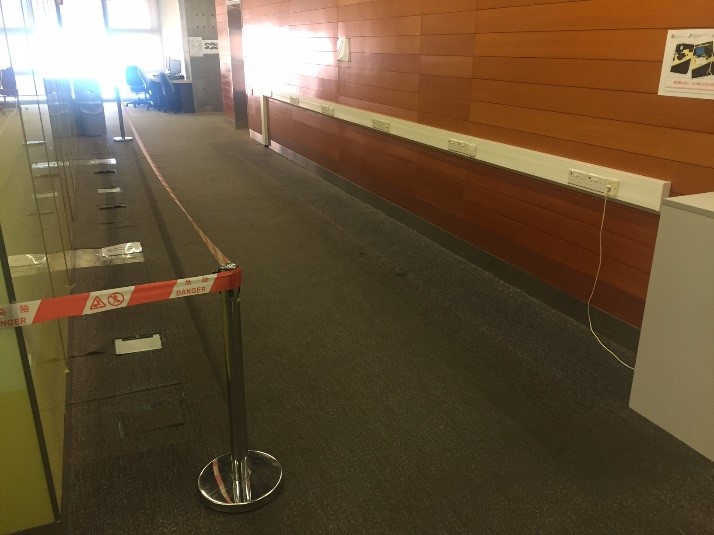
To facilitate setting up of new cabinets in corridor area of HHB SCC, PCs in the area are removed temporarily. User may make use of other PC in SCCs for computing purpose.

The renovation work will be done by late August 2015 and we expect the PCs will be reinstalled the area by new academic year.


Renovation
Renovation

4. Audio-Video (AV) Works in Summer

Similar to previous years, there are classroom AV works this summer including enhancement of security of AV equipment, meeting room re-cabling, trial setup of video scaler in HHB LT, etc. We would like to draw your attention on above works and thanks for your patience for any inconvenience during enhancement work. Users are welcome to contact ITU helpdesk at x0818 (HHB) / x0819 (WK) should any feedback / enquiries on this.

CPCE Printer