1. Reminder on Check your Campus Access
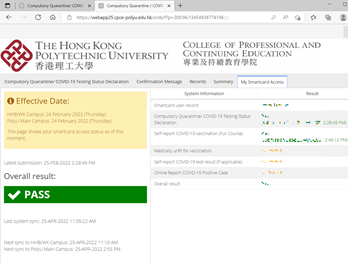
User is reminded about COVID-19 reporting systems and need to ensure information is updated before accessing to campus, you may check your campus access first before you return to campus, please click
here > click My Smartcard Access tab and ensure PASS shown in “Overall result:”
If you have any questions, please contact our helpdesk at 3746-0818/3746-0819 or email to pfitoper@cpce-polyu.edu.hk .
For the COVID-19 Reporting Procedures and related Systems, please click here.
|
 |
 |
2. Reminder: Note to Students Who Will Graduate or Leave From HKCC / SPEED
Please note that the following IT services will be terminated after you graduate or leave from HKCC / SPEED:
- Student email account
- Microsoft OneDrive bundled with student email account
- Microsoft Office 365 ProPlus applications (Microsoft Office / Mac Office) offered via student email account
- Print quota account
- Student Notebook Loan Service
- Campus Wi-Fi service, including Eduroam
- Moodle
- Campus PC / other systems login
- Access to Student Computer Centre
Reminder:
- Please backup data/files from the above systems if you need to keep them before graduation in order to prevent inconvenience and /or data loss.
- Remaining balance in print quota account is non-refundable and non-transferrable at any time.
- Should you have outstanding debit note for student notebook payment, you must settle it before graduation.
- You may consider purchasing the Microsoft products at Microsoft Store if you wish to continue using them after leaving HKCC / SPEED.
- You can only access Transcript request feature in my.HKCC / my.SPEED after graduation
- You are also recommended to observe email announcement from PolyU Alumni Affairs and Development Office about the provision of lifelong PolyU alumni email account and OneDrive online storage.
Students are welcome to contact ITU helpdesk at 3746-0818 / 3746-0819 or email to pfitoper@cpce-polyu.edu.hk for enquiry.
|
 |
|
3. Reminder on Online Assignment / Take Home Exam Submission
Please check Wi-Fi or cable network performance when necessary, e.g., using OFCA app / web, to test performance of your broadband and internet connection, ensuring you have got a minimum of 5Mpbs upload speed before you submit your assignment.
Ensure your device is connected to power adaptor (mobile device) to minimize inconvenience due to running out battery power.
If any case you cannot submit your work to Moodle, please submit the work to lecturer via other means, e.g., email, ASAP. Do not simply send screen capture to lecturer about the problem. Please follow lecturer instruction if there is guideline already.
|
 |
|
4. Reminder: Backup Course Materials at Moodle, OneDrive and TempCloud Before Semester End
Please note that 2nd semester will end soon, the courses of 2nd semester in Moodle will be archived after the commencement of summer term. Student will no longer be able to access course materials of the 2nd semester, OneDrive and TempCloud links from archived Moodle course.
Reminder:
- Please backup course materials from Moodle if you need to keep them.
- You are also recommended to backup the course materials from OneDrive and TempCloud.
- Students need to seek lecturer’s approval for accessing archived teaching materials in Moodle.
- Lecturers will not be affected by this archive policy at Moodle, but files in TempCloud will be also archived periodically.
For Northumbria University programme student, please refer to SPEED announcement.
|
 |
|

