


Booking FAQ
Opening hours and booking hours of e-Making Studio
Who can book the e-Making Studio?
Booking fee
How do I know if my booking is successful?
Can I cancel, change or refund after booking confirmation?
Rules and regulations
What is e-Making Studio?
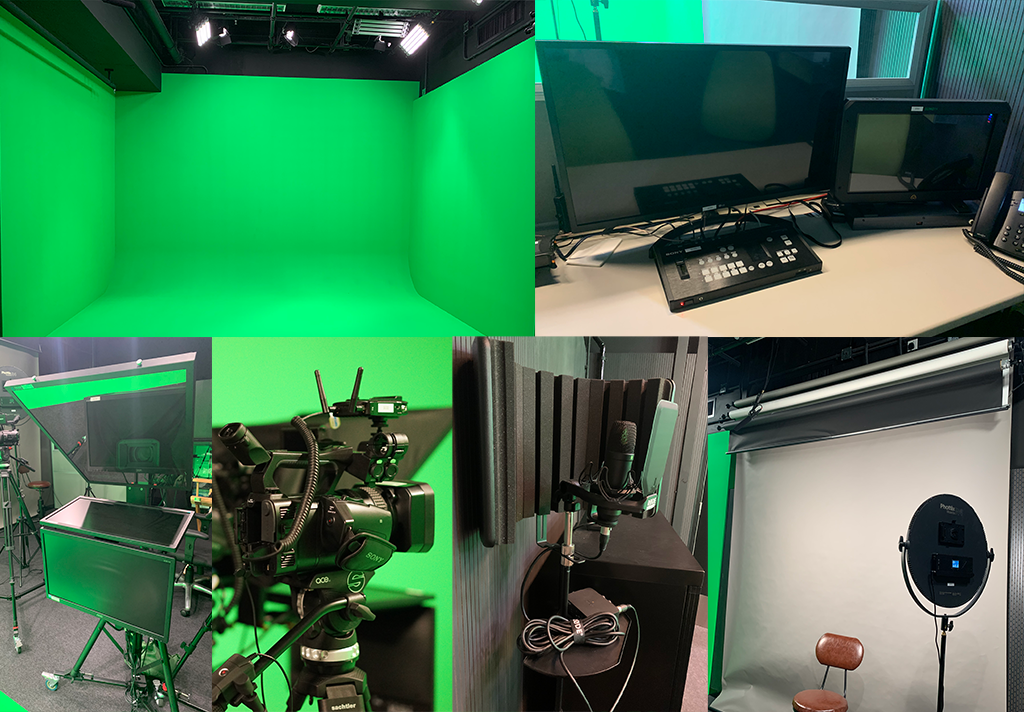
e-Making Studio is dedicated to support audio and video recording, photo shooting, creation of class materials for blended learning, recording interviews of Units, Divisions or students, speech rehearsal etc.
The studio equipped with a 4m (L) x 3m (H) x 3m(W) 180 ̊ Chroma key background, three high quality Camcorders, microphones and lighting control system, it is capable to support small group interview with curtain backdrop, interaction with video/graphics displayed at chroma key background, small-scale product video demonstrations in front of a solid backdrop, audio recording and still photography.
Please see the “Studio and Equipment Record Form " to know the equipment in e-Making Studio.
Opening hours and booking hours of e-Making Studio
|
Facility |
Location |
Opening Hours |
|
e-MakingStudio |
Room S502a, 5/F, South Tower, PolyU WK Campus |
Monday to Friday: 9:30 am to 7:00 pm* Saturday: 9:30 am to 4:30 pm* Sunday and Public Holidays: Closed |
|
Session |
Timeslot |
Available Day |
|
1 |
9:30 am – 11:30 am |
Monday to Saturday |
|
2 |
12:00 noon – 2:00 pm |
|
|
3 |
2:30 pm – 4:30 pm |
|
|
4 |
5:00 pm – 7:00 pm |
Monday to Friday |
User can book either one or two hours per session and up to two sessions per week.
Who can book the e-Making Studio?
The following users can make bookings through the System:
PolyU CPCE students, academic and administrative staff.
How to make a booking?
- Please check the sessions available for booking at the e-making room schedule. Bookings are made on a first-come-first-served basis unless otherwise specified.
- Individual bookings can be made at least 2 working days and up to 30 working days in advance through the email with application form to ITU e-Making Studio email: This email address is being protected from spambots. You need JavaScript enabled to view it. and ITU staff will contact you for the assessment of your video shooting/photo taking requirement.
- The duration of each booking session is 1 hour or 2 hours. Each individual student ID can book only one session per day and no more than 2 sessions per week.
- Please settle the payment at iPay Kiosk# within a working day upon receiving email notification of your booking result and bring the receipt to ITU helpdesk counter at 5/F, South Tower,Student Computer Centre, WK Campus for confirming the booking. The time-slots will be released to other users if you fail to do so.
# For HHB campus, please go to iPay Kiosks on UG/F
For WK campus, please go to iPay Kiosks on S2/F
- A booking confirmation will be sent to the user’s student / staff email account. The confirmed booking cannot be transferred.
Booking fee
1 hour (half session) / $200, 2 hours (1 session) / $400 *
Check in and out procedure
- The applicant must produce the valid booking receipt together with his/her student card used for registration at the ITU helpdesk counter, 5/F,South Tower, Student Computer Centre, WK campus before using the facilities.
- The studio assistant will brief user on proper use of the studio equipment and confirm the environment setting based on the user’s requirement collected from the pre-session communications.
- Users will be given a "Studio and Equipment Record Form" showing the equipment provided that you are required to sign back to acknowledge receipt of the equipment in good working order with no damages.
- Before leaving the studio, users must make sure they have saved their media files in their own storage devices. Any files will be deleted on a daily basis at the end of each session.
- The user must inspect the equipment with the studio assistant that allows 15 minutes for the procedure before leaving.
|
ITU Helpdesk Counter Opening Hours |
Term Period |
Semester Break and Summer Period |
|
Monday – Friday |
8:30am - 10:30pm |
8:30am – 7:30pm |
|
Saturday |
8:30am - 6:30pm |
8:30am - 6:30pm |
|
Sunday and Public Holidays |
Closed |
Closed |
Note: The opening / service hours may be adjusted during special periods. Users will be informed via e-mail notices.
How do I know if my booking is successful?
The applicant has to bring the receipt of booking fee to ITU helpdesk counter at S5/F, Student Computer Centre, WK Campus to confirm the booking and a booking confirmation email will be sent to your college email account.
Can I cancel, change or refund after booking confirmation?
The applicant should send email to ITU e-Making Studio: This email address is being protected from spambots. You need JavaScript enabled to view it. for any booking cancellations or change at least one working day in advance.
The booking is not transferable, and no booking fee will be refunded; the user can make a free booking session later.
*Users who fail to take up their booked sessions (a “no-show”) on two occasions within 30 consecutive days will be barred from making advanced booking of e-Making Studio for two weeks and no booking fee will be refunded.
Rules and Regulations
- Each individual student ID can book only one session per day and no more than 2 sessions per week.
- The maximum number of people per session is 6.
- The confirmed booking cannot be transferred.
- The studio is dedicated to the production of academic or CPCE related projects.
- All equipment is for use inside the studio only.
- Equipment failure/damage/loss must be reported immediately to the studio assistant or the ITU helpdesk counter. If it is determined that the damage or parts missing is due to misuse or negligence, the user will assume full financial responsibility for the costs of repair, labour, replacement parts, etc.
- ITU staff have the right to stay in the studio for assist or inspection during users’ reserved session.
For assistance, please email to This email address is being protected from spambots. You need JavaScript enabled to view it. or contact ITU helpdesk at 3746 0819